Trend DashBoard Indicator
Trend Dash Board Indicator for MT4.Shows BULLISH and BEARISH Arrow signals based on 4 trend indicators. BUY and SELL forex signals.
Description
The Trend DashBoard Indicator for MT4 provides BULLISH or BEARISH trend information and provides UP and DOWN arrow signals. The trend information is based on MACD, Stochastic, Moving Average, and RSI MetaTrader indicators. So, forex traders can use them in any technical trading strategy to BUY and SELL based on the arrow signals.
So, forex traders can use them in any technical trading strategy to BUY and SELL based on the arrow signals. We also recommend checking out the Buyers Sellers Dashboard Indicator and the Forex Dashboard Full Indicator, which complement this tool with broader market views and more detailed buyer/seller sentiment.
Moreover, the indicator shows additional information regarding the status of the Account name, Account number, Account equity, Current leverage, Account margin, Account balance, Free margin, Broker name, Server time. Additionally, the Last Price, Open Price, High Price, Low Price, and Spread of the trading instrument are provided by the indicator.
The indicator works well for new and advanced forex traders. It’s available as a free download and is easy to install.
Trend DashBoard Indicator For MT4 Trading Setup
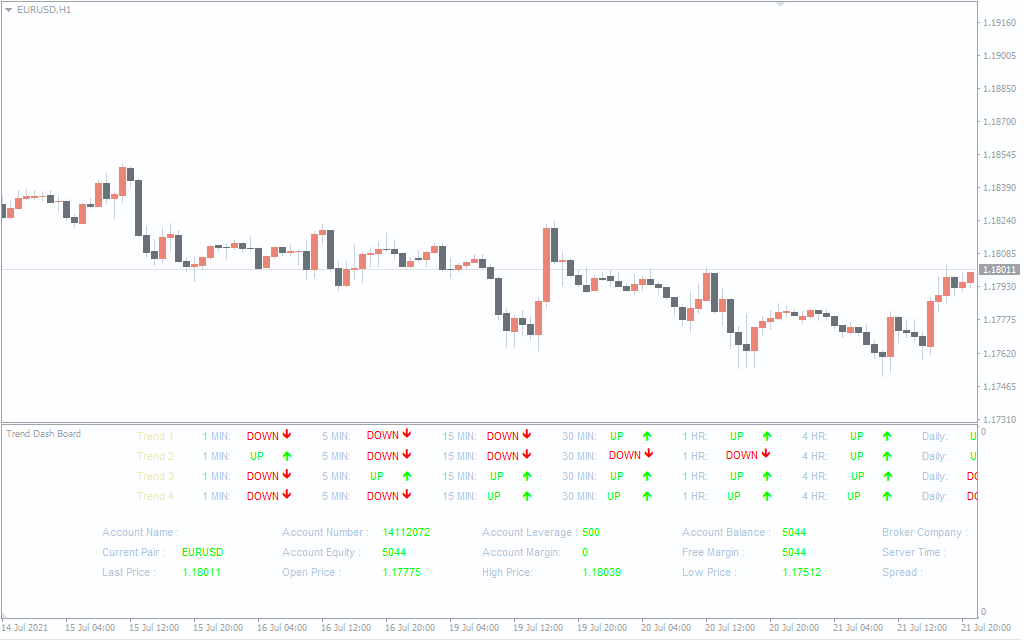
The above EURUSD H1 chart shows the Trend DashBoard Indicator for MT4 in action. Trend 1 corresponds to the forex trading signals of the MACD (Moving Average Convergence and Divergence) indicator. While Trend 2 provides the Stochastic indicator technical trading signals, Trend3 shows the BUY and SELL arrow signals using the Moving Averages. Finally, Trend 4 shows the UP and DOWN arrow forex trading signals using the RSI (Relative Strength Index) MetaTrader indicator. The UP signals are in Lime and Down arrow signals in RED, while the account details are in LIME.
The best method to trade using this indicator is to place BUY or SELL positions based on the confluence of the indicators. Traders can first choose their preferred trading time frame. If a minimum of 3 trend indicators are BULLISH a BUY trade is placed with stop loss below the previous low. On the other hand, if more than 3 indicators signal a BEARISH trend, then a SELL position with stops above the previous high will produce the best results. Generally, the take profit position in this technical trading strategy is based on the risk-reward ratio. However, forex traders can exit if the trend changes from BULLISH to BEARISH and vice versa.
The next trading strategy is to trade using multiple time frames (mtf). In this trading strategy, the forex trader can use the higher time frame to identify the trend direction. And use the lower time frame to identify the best entry point with low risk. As a result, forex trader tends to stay with the direction of the major trend.
The Trend Dash Board Indicator for MT4 shows the trend in all timeframes. So, it works on all intraday timeframes as well as daily, weekly, and monthly charts.
Pros and Cons of the Trend DashBoard Indicator
 Pros
Pros
- Multi-indicator confluence: Combines MACD, RSI, Stochastic, and MA into one panel for more reliable trade signals.
- Extra account stats: Displays margin, balance, spread, and broker info directly on the chart, saving time.
- Flexible timeframe use: Works across intraday, daily, and even monthly charts without restrictions.
 Cons
Cons
- Information overload: Beginners may find the dashboard crowded with too much data at once.
- Confirmation needed: Arrow signals work better when combined with price action or support/resistance.
- Potential lag: Like most trend indicators, signals may appear slightly late in very volatile markets.
Conclusion
The Trend DashBoard Indicator for MT4 provides the forex traders with a visual representation of the BULLISH or BEARISH market trend of all chart time frames. The arrow signals provide BUY and SELL forex trading signals. Additionally, the indicator is free to download and easy to install. From my own experience, it is especially powerful when used in combination with moving averages or price action filters. To explore this further, I recommend reading our blog article Mastering Forex Trading with Moving Averages: A Comprehensive Guide, which ties in perfectly with the Trend DashBoard system.
Frequently Asked Questions (FAQ)
 Does the Trend DashBoard Indicator repaint?
No, the signals remain fixed once a candle closes.
 Can I use it for scalping?
Yes, it works well on M5 and M15, though confirmation from price action is advised.
 Is this indicator beginner-friendly?
Yes, but new traders may need time to get used to the amount of data on the dashboard.
 Does it work on non-forex assets?
Yes, it can be applied to commodities, indices, and cryptocurrencies on MT4.
 How do I get the best results with this indicator?
Look for confluence — if at least three of the four built-in signals align, entries tend to be more reliable.